What is an accessible digital service?
Authors and date
- Submitted on: May 25th 2021
- Pascal Guitton; professor of computer science and researcher in the Potioc team (Inria, University of Bordeaux, CNRS)
Disability and accessibility
There are more than one billion people with disabilities in the world. The disability can be sensory (vision, hearing), motor (movements) or cognitive (attention, memory, emotions). Sometimes cumulative, it may be innate or acquired following an accident or illness and may evolve with age. We speak of a disability situation to take into account the importance of the environment in the impact of a disability on a person's life. For example, a properly designed ramp may allow a person with reduced mobility unrestricted access to a building, whereas the presence of stairs will condemn him or her to a situation of disability.
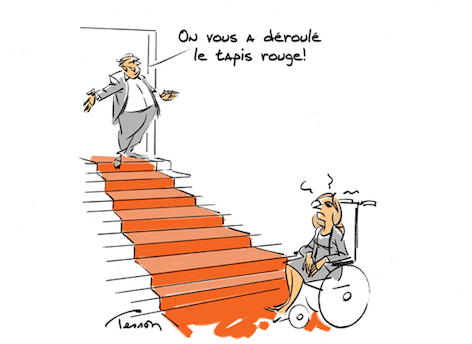
Figure 1: Look for the mistake ! Drawing by Luc Tesson - Extract from www.dessinateurdepresse.com
This example illustrates the notion of accessibility perceived mainly for the access to buildings: governed by laws and regulations, it is controlled during the instruction of the building permits of buildings receiving the public and taught in the schools of architecture. But it is in fact multifaceted and affects many other subjects, such as access to transportation (bus, train...), understanding a film that is not subtitled for people with impaired hearing, or crossing a roadway when the traffic lights only display a red or green pictogram for a pedestrian with vision problems.
Let's go back to the definition proposed by S. Rocque in 2012: "Universal accessibility is the character of a product, process, service, information or environment that, with the aim of equity and in an inclusive approach, allows any person to carry out activities independently and to obtain identical results". In this definition, "inclusive" means without discrimination, "autonomous" calls for respect of the person's self-determination and "identical" refers to the usefulness, usability and acceptability of the solution concerned.
Digital accessibility
Digital technology concerns all facets of our private and professional lives. It is therefore essential to take into account the exclusions generated by equipment, software or documents that are not accessible to people with disabilities. For example, to perceive information or instructions for people with sensory impairments, to type and/or manipulate a mouse or a smartphone with motor impairments, or to understand the main information on an overloaded web page with cognitive impairments. It is clear that these situations inevitably lead to discrimination and exclusion from social life, access to training and employment, information, entertainment... This observation is all the more frustrating as digital technology, when accessible, is a potential source of improvement in the quality of life of people with disabilities.
It is therefore essential to develop digital accessibility and it is easy to list the main motivations for:
-
individuals: to increase self-determination and overall quality of life;
-
society: to contribute to making it truly inclusive by fighting discrimination;
-
companies and organizations:
- increase potential profits by increasing the number of customers or visitors to a site, previously excluded from the target market;
- enable their employees to work and train in conditions of fair efficiency by providing them with an accessible work environment;
- improve its image (we speak of e-reputation); conversely, there are blacklists of companies refusing this evolution that associations encourage to boycott;
- respect national and European legislation and directives that will increasingly impose digital accessibility on all actors.
- teachers: contribute to offer reasonable working conditions to pupils/students and thus to fight against school failure and the exit of the educational system.
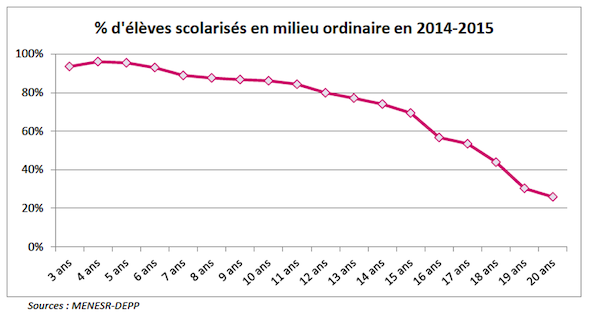
Figure 2: Percentage of students with disabilities in the mainstream environment - CNESCO Conference 2016
Regulations
There are many laws and regulations that concern the consideration of disability in our societies. First of all at the international level, France has ratified the International Convention on the Rights of Persons with Disabilities1 adopted in 2006 by the UN and which commits states to provide all fundamental rights and freedoms with explicit mention of access to digital systems and the Internet.
Then, at the French level, we have to mention the different Handicap Laws2, especially the one of 2005 on equal rights and opportunities, participation and citizenship of disabled people. We can appreciate an evolution from a logic of insertion (at the expense of the person in a situation of disability) to a logic of inclusion (also at the expense of the society). It deals with the problems of accessibility (registration, knowledge, buildings...) as well as the principle of compensation (AVS support...).
Finally, let's mention the General Rules for the Improvement of Accessibility3 (RGAA) composed of two parts: first the obligations to be respected which are addressed to the authors of web pages and services and then a list of operational criteria to check the conformity. Initially reserved for the administration, this regulation is gradually being extended to some private actors.
A study4 conducted in 2014 by the BrailleNet association demonstrated the inaccessibility of a very large majority of websites of French administrations and communities that were in violation of the 2005 law and its application decrees. Only 17.6% of a representative sample of 600 public structures (ministries, prefectures, municipalities...) complied with the obligation to provide a self-declaration of conformity and among those who offered a certificate (3.7%), only one offered a homepage without any error. Even if accessibility has progressed since this study, we are still very far from an acceptable situation.
How to improve digital accessibility
It is of course impossible in a short sheet to detail all the existing solutions; however, several important levels should be distinguished.
Let's start with interface equipment by grouping them around their main objectives:
-
inputting information (commands, text...): adapted keyboards, voice recognition, motion capture (head, tongue, eye), and tomorrow perhaps brain-computer interfaces;
-
restoring information (text, image, sound...): Braille display, voice synthesis, effort feedback devices...
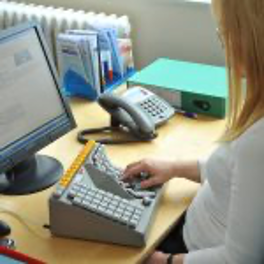
Figure 3: Unidextrous Keyboard -- © Maltron
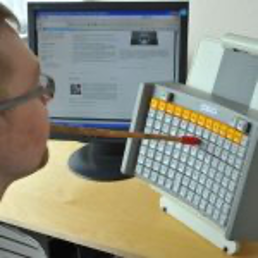
Figure 4: Mouth-to-Wand Keyboard -- © Maltron
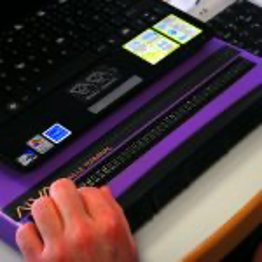
Figure 5: Braille page -- Credit S.Delorme -- WikiMedia, CC BY-SA 3.0
Let's continue by stating some simple principles like:
-
increasing the signal (magnifying glasses, font size, adapted colors and contrasts...), possibility of sequentially typing a sequence of usually simultaneous characters (e.g. Ctrl C), scans of lists;
-
facilitate comprehension, for example, by slowing down the flow or by removing distractors of attention.
Now consider the operating systems of computers, including those of smartphones; they all offer features to improve digital accessibility: keyboard alternatives (to replace a complex command to type), magnifiers, signal substitutions (replace a beep with a visual message), screen readers that render the textual content of a window by its voice synthesis... Examples: Windows, Mac OS, Linux, Android... So many tools often unknown but which are freely available and which, if they were used, would open the access to the digital systems for many people in situation of handicap.
Then, there are many software that now offer adapted functionalities, from office tools to web browsers, including video games and social networks. For example, FaceBook uses artificial intelligence to detect the main elements in a photo; a voice synthesis of their description allows a visually impaired person to read them and react like his friends.
Last but not least, we must insist on the accessibility of the digital content. Indeed, you can use an accessible web browser but if the content of the page you are visiting has not been designed in an accessible way, you will not be able to use it. This is why, since the genesis of the web, a reflection has been initiated within the W3C5 (consortium that manages its development) which led to recommendations, including the WCAG6 (Web Content Accessibility Guidelines) whose latest version (2.2) was published in May 2021 and which form the basis of the GAAR. They are based on a dozen simple rules respecting 4 principles - to be perceptible, usable, understandable, robust - and describe the most common mistakes not to be made. In addition to web content, we are constantly using digital documents (texts, spreadsheets, presentations...). In order to make them accessible, it is necessary to apply some simple principles, for example:
-
use the styles provided by the editors to structure the text (headings, sections) in order to make it easily usable by a screen reader;
-
provide an alternative text to describe an image or a video;
-
name each column/row in a table in an informative way;
-
provide a description for urls (especially those constructed with long meaningless strings).
In a similar way to web pages, there are accessibility checkers that will, for example in Microsoft Word, detect errors, explain their origin and propose their correction. And so, in the same way that it is no longer acceptable today to produce documents with spelling mistakes when there are a large number of automatic correctors, it should no longer be tolerable to produce and/or distribute content that is inaccessible when we have effective assistance at our disposal.
Additional resources
Conseil National du Numérique. L'accessibilité numérique, entre nécessité et opportunisme - Une obligation légale vis-à-vis des citoyens, un levier stratégique pour les acteurs, Rapport 2020 [en ligne]. Available at site la CNUM [16/06/2021]
FIPHFP. Ressources Accessibilité numérique]. Available at site FIPHFP [16/06/2021]
Pascal Guitton. Pourquoi il faut développer l'accessibilité numérique [en ligne]. Blog binaire - Le Monde, 10/07/2018. Available at site Binaire [16/06/2021]
Pascal Guitton, Hélène Sauzéon. Accessibilité numérique]. MOOC Available in french on FUN plateform[16/06/2021]
Sylvie Rocque, Jacques Langevin, Hajer Chalghoumi, Abir Ghorayeb. Accessibilité universelle et designs contributifs dans un processus évolutif [en ligne]. Revue développement humain, handicap et changement social, 19(3), 7-24, 2011. Available at site [16/06/2021]
YouTube, Liste de vidéos sur l'accessibilité numérique
Sources
-
Convention internationale des droits des personnes handicapées. Available at site des Nations Unis [16/06/2021] ↩
-
Loi du 11 février 2005 pour l’égalité des droits et des chances. Disponible sur handicap.gouv.fr [16/06/2021] ↩
-
Règlement Général d'Amélioration de l'Accessibilité . Available at www.numerique.gouv.fr [16/06/2021] ↩
-
Ce que les sites Web publics nous disent de leur accessibilité (Mars 2014). BrailleNet. Available at www.braillenet.org [16/06/2021] ↩
-
Pascal Guitton. W3C invente la nouvelle manière de concevoir les standards du numérique [en ligne]. Blog binaire - Le Monde, 10/05/2018. Available at lemonde.fr [16/06/2021] ↩
-
https://www.w3.org/Translations/WCAG20-fr/ [16/06/2021] ↩